
This guide will walk you through the process of mining Ravencoin using the program T-Rex on Flypool (ethermine)
Step 1: Download Exodus. This is where you store crypto that you are mining, and it’s how you spend it.
Step 2: Install Exodus. Double-click the installer you downloaded, and it will walk you through the process. When you’re done, write down your Ravencoin public wallet address in notepad. You may need to add Ravencoin in Exodus, but once it’s there, click Ravencoin, then click “Receive” to view your public address.
Step 3: Download T-Rex. This is the program that mines for you. Get the newest one in the highest Cuda version. If it crashes on step 5 when you run it, return here and get a lower Cuda version.
Step 4: Set up T-Rex. This will make it mine for you instead of somebody else. When you unzip T-Rex, there is a file called “RVN-2miners.bat” that you will edit.
Start by renaming it. Rename it to “Start RVN Mining.bat”
Next, right-click that file, and choose “Edit” to do that.
You will change the server address, the port, and the wallet address in this file.
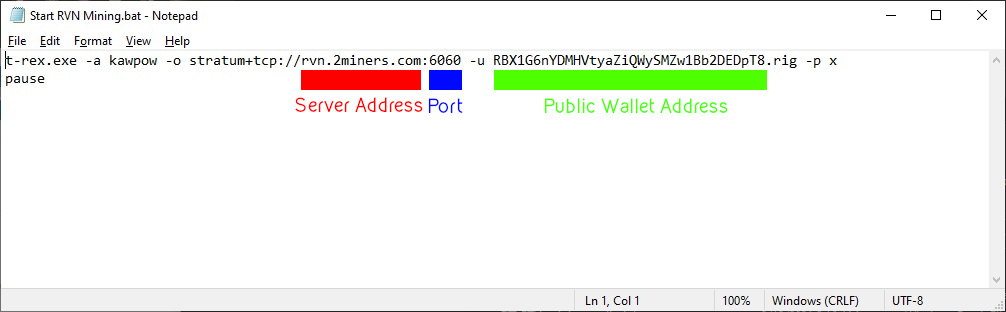
For the server address, change it from rvn.2miners.com to stratum-ravencoin.flypool.org
- After the colon, change the port from 6060 to 3333
Change the user name to your public wallet address for Ravencoin. You got that from Exodus
Save and exit Notepad when you are done.
Step 5: Start T-Rex by double-clicking the Start RVN Mining.bat file you just edited. If it crashes here, go back to step 3 and get a different version of T-Rex.
Step 6: Verify it’s working by going to Flypool and typing in your public wallet address. If it says you’re not mining anything, give it about 20 minutes and check again. If it still isn’t showing up, go to step 4 and verify you did everything correctly.
All done! You’ll be paid what you mine when you reach the payment threshold (50 Ravencoins by default. Change it by going to settings on Flypool which are available when you type in your public wallet address.)
Important: You can’t pay with Ravencoin here through the website, because the point of sale system we use doesn’t accept it. You can exchange it for Bitcoin or another supported coin in Exodus, or contact us and we can just set something up where you can use Ravencoin directly.