
Cryptocurrency can be a fun and somewhat anonymous way to buy things on the internet. This guide is a walkthrough of how to “mine” cryptocurrency to make small online purchases using a gaming PC. If you’re not sure how to do that, this guide may be useful for you!
Getting started
Crypto is kind of a deep subject. How do you want to learn this?
Option 1: Just tell me exactly what to do. Explain nothing except how to harvest money out of the air with my computer (takes less than 10 minutes) Click here to go to the short guide.
Option 2: Tell me the steps and explain them so I can make informed decisions and make a little bit more money (takes 30 to 60 minutes) Stay right here and keep reading!
Important information
Point 1: There isn’t a consensus on the “best” way to do any of this. Everyone has a slightly different opinion, method, software preference, etc… This guide shows one way to do it that worked well at the time of writing, but it is far from the only way. We suggest doing your own research on the best way to make/interact with cryptocurrency.
Point 2: Some countries prohibit the use/procurement of cryptocurrency. We are in the United States where it is fine, but if you are outside the United States, you should research if you are allowed to use/hold cryptocurrency. This Wikipedia page may help you determine if you are allowed to follow this guide.
Point 3: Power supplies–particularly laptop or low-end power supplies–are not designed to run constantly. Mining cryptocurrency involves leaving your computer working at 100% for several hours/days at a time, which may exceed what your power supply is designed to deal with. Please don’t break your computer, and if you do break your computer, don’t blame me! This is at your risk!
What the hell is cryptocurrency?
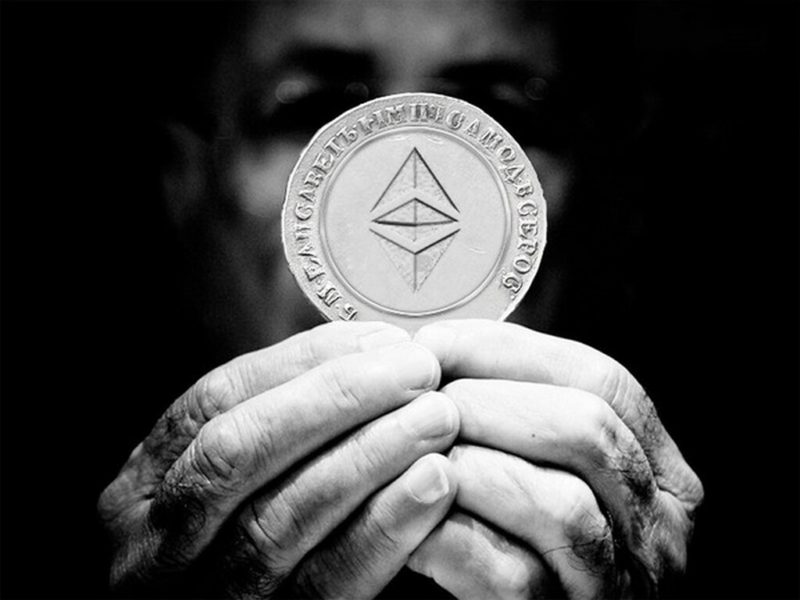
Cryptocurrency (shorthand: crypto) is a type of currency that you can use to buy things, hire services, or to support causes that you care about. It is also a type of investment that some types of people invest in hoping for a return. Bitcoin, Ethereum, or Dogecoin are common examples of cryptocurrency.
Crypto differs from government-issued money (commonly called “fiat currency“) in that instead of being regulated by politicians, it is regulated by, effectively, a math formula that is resistant to corruption/singular ownership. This has its pros and cons.
Like fiat currency, it has no inherent value, but it does have a trade value that is generally agreed upon day-to-day based on what people are willing to pay for it. Google can tell you the current value of a given cryptocurrency by typing something like “0.003 BTC in USD.”
For the sake of comedy in the future: as I write this, that number is $146.41. Check what it is today.
How do I get it?
Lots of ways! The most common are to exchange fiat currency for it, or to “mine” it.
Exchanging fiat currency for crypto can be done through service providers like Kraken or Coinbase.
Mining for it is done on computers or specialized mining machines–usually using parts from Nvidia or AMD. This is why you can’t buy graphics cards sometimes. Mining cryptocurrency is what this guide is about.
What is cryptocurrency mining?
This is a complicated concept, and for most people, how mining works on a technical level isn’t important.
To explain it simply: mining is a crappy analogy for the reward system a cryptocurrency uses to get people to make the currency function. When you buy something with crypto, a computer somewhere is going to have to record that data, and process the transaction. This record of transactions is called a “blockchain.” It takes a shit-ton of math to maintain and grow the blockchain, so the system is designed to entice people to do the math the crypto requires by paying them in cryptocurrency.
Therefore, a person who is a “cryptocurrency miner” is a person with a fast-ass computer that puts his or her computer to work on that math and gets paid in crypto to do it.
Can I be a cryptocurrency miner?

“Shrug” by Sutha Kamal is licensed under CC BY-SA 2.0
Probably. It requires a few things:
- Electricity to run things
- A stable internet connection to get new jobs
- A decent gaming computer to do the math
If you have these, you’re good to go.
Step 1: Get a wallet
Just like how “mining” is a pretty weak analogy for blockchain rewards, a crypto “wallet” is an analogy for what is really going on behind the scenes. It performs two important functions:
- It is a tool to send cryptocurrency from one address to another one.
- It is a method to claim a new crypto address, which is just a record in that blockchain that the miners are working on maintaining.
“Wallet – Money” by 401(K) 2013 is licensed under CC BY-SA 2.0
There are a ton of these, but some cool ones are:
Exodus: A free computer program and/or cell phone app that lets you store and use just about any cryptocurrency. Supports almost all popular coins.
Metamask: A free browser extension that lets you store or use your cryptocurrency. Primarily used for Ethereum, but it can do a few other coins, too.
Both of these programs let you create a new wallet address, and they are both dead-simple to use. If you ever want to use something other than Ethereum and/or want to have a nice central spot for everything, I suggest Exodus. Either way, pick one and set it up. Both are completely brainless to set up and walk you through the whole process.
Step 2: Pick a currency you want to mine
There are so many; which one to pick? You might think Bitcoin because that’s the most well known, but Bitcoin’s actually a pain in the ass to mine. In fact, how efficiently your computer mines things depends mostly on the type of graphics card(s) you have.

“Cryptocurrency Mining, Bitcoin mining stock photo” by Crypto360 is licensed under CC BY 2.0
Fortunately, other people have figured out all that shit and have a website and database that lets you compare profitability of mining one currency compared to another. Head over to whattomine.com and check which one’s the most profitable for your setup.
As of the time of writing this guide I have an Nvidia GTX 1080TI and an Nvidia GTX 1060. For me, today, it says the most profitable one is the cryptocurrency Ethereum, which should make around $5 USD worth of Ethereum every day.
I know that Ethereum requires all the GPUs involved to have more than 4GB of VRAM, which I have. What if I didn’t? Which one’s the best for cards with 4GB or less? The site says Ravencoin is my best bet. If I were to mine Ravencoin with my setup, it estimates I would make around $3 USD worth of Ravencoin every day.
Your best bet is to mine whatever is the most profitable on your hardware, and then use Exodus or an exchange service like Binance to exchange the coins into something else. With these two examples, we can take Ethereum directly, but we can’t take Ravencoin because the point of sale system doesn’t accept it because it’s a more obscure coin.
Step 3: Pick a mining pool
Collectively working with others (pooling) your resources is the best way to get the rewards. There are lots of these, but in general they pay you via a bonus system, pay you a salary, or pay you with some kind of weird voodoo.
- The bonus system, also called PPLNS (Pay Per Last N Shares) pays you based on how many awards were received by all of the miners in a set period of time. They take the amount of rewards received, compare that to how much you contributed (measured in megahashes per second, or mh/s), and pay you a percentage of the reward. An example of a PPLNS pool is ethermine.org
- The salary system, also called PPS (Pay Per Share) pays you slowly and steadily based on how much work you do. You might find 100 rewards, or 0 rewards, and you’ll still get paid the same amount because the reward amount is a fixed number. An example of a PPS pool is f2pool.com
- The weird voodoo system pays you in some crazy-ass way that may or may not be good. They’re all completely different from one another. An example of a weird voodoo pool is unmineable.com, which is a place where you mine Ethereum for them, but they pay you in something else, like Dogecoin.

‘Toothpick voodoo’ by Juha-Matti is licensed under CC BY 2.0
In general, the bonus system and the salary system end up averaging out over time. Your mileage will vary with weird voodoo systems, but for life in general, if it seems too good to be true, it usually is. A good place to compare and find mining pools is miningpoolstats.stream. For the purposes of the guide we’ll use ethermine.org because we can mine both Ethereum and Ravencoin there, easily, and they pay me exactly what they say they will.
Step 4: Download a mining program
You have your wallet, coin, and pool picked out: now let’s grab the program that will actually do the math and make money for you. Like everything else, there are lots of options, and your can customize this experience, too.

“‘Cats have it all – admiration, an endless sleep, and company only when they want it.’ Rod McKuen” by Trish Hamme is licensed under CC BY 2.0
They’re all ugly terminal programs, but they generally function the same. Nearly all of them take a small fraction of the the mining rewards you make, so they’re all distributed for free. There are free mining programs, but they’re all slower than the ones that mine a few seconds per hour for the developer. The amount that it mines for the developer is worth the extra speed you get from using them.
For Ethereum
- T-Rex. One of the most popular mining programs. Takes 36 seconds out of every hour to mine for its creator. Works on Nvidia only, and seems to get a little better performance than others. Grab the highest CUDA version you can get. If it’s not compatible it will crash and you know you need a lower version. 1xxx cards and newer can use the latest version.
- lolMiner. Another good one. Takes 25 seconds out of every hour to mine for its creator. Works on both AMD and Nvidia cards.
For Ravencoin
- T-Rex. Works just like it does for Ethereum, and takes 36 seconds out of every hour to mine for its creator. Nvidia only. Grab the highest CUDA version you can get. If it’s not compatible it will crash and you know you need a lower version. 1xxx cards and newer can use the latest version.
- GMiner. A good alternative if you have an AMD card. Takes 36 seconds out of every hour to mine for its creator, and works on both AMD and Nvidia.
Regardless of what you choose, unzip the latest version into a folder and get ready to configure it to work for you.
Step 5: Set up the mining program
In the home stretch now. You have a wallet, you’ve picked a coin to mine, you know where you’re going to mine, and you have the tool you need to use to do the mining. Now you just need to set it up!
I will set up T-Rex to mine Ethereum on ethermine.org in this example. Every mining pool has directions on how to set this up with a variety of popular mining programs. Likewise, most mining programs include pre-written startup files to connect to different mining pools that just need to have slight edits done to them. Regardless of what you’re mining and where you’re mining it from, your setup will be very similar.
Start by pulling up the directions on the pool. On ethermine.org these directions are right here.
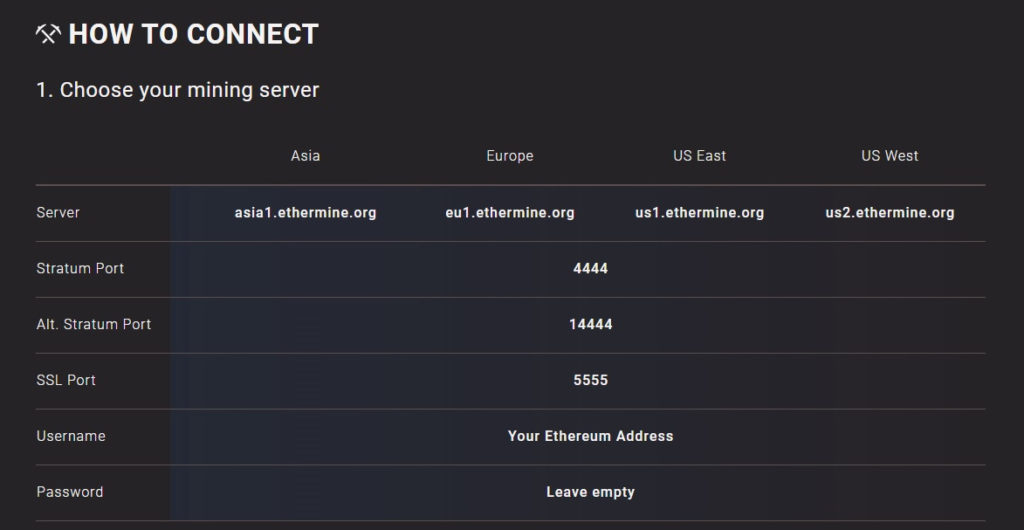
Every pool will have basically the same set of instructions. The important data you need from here is the server address (us2.ethermine.org) the stratum port (4444) and the Username. A benefit of ethermine.org is that there are no usernames or passwords to enter, and mining is completely anonymous. They only need to know where to send the money, and you have that from your wallet. Other pools may have a login/password you need to enter.
Look through the T-Rex files and find the ETH-ethermine.bat file. This is the program you will run to start mining, so you need to tell it what your address is, and make sure you are connecting to the closest server.
right click and choose to edit the .bat file. This will open a text editor with a long command line. You need to replace a couple lines in there.
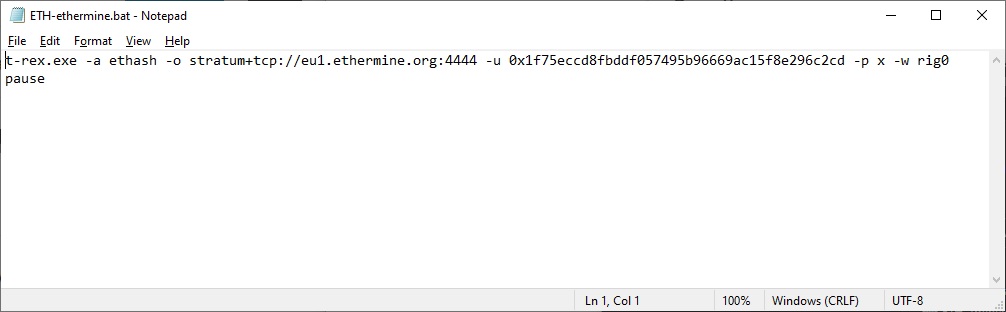
First you set the server. Look for the line that goes “stratum+tcp://…” and replace the website shown with the closest server to you on ethermine.org. In my case that is us2.ethermine.org, and the stratum port is 4444. That means I would need to replace that line with stratum+tcp://us2.ethermine.org:4444
Next you set the username. In ethermine’s case, that’s your public wallet address, so you will put that after the -u. By default it has another address in there, so you need to replace that data with your address. Your address can be found in your wallet. In Exodus, to show that data you click on the type of currency you want to use, then click the “Receive” button. Copy and paste your address into the line of code after the -u to replace the address that is in there by default. You can also replace the “rig name” section (set to “rig0” by default in T-Rex) but that’s optional.
At the end it should look something like this:
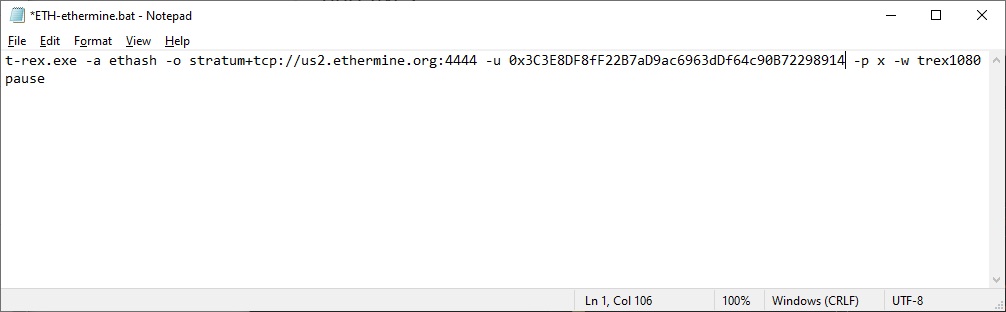
That’s it! You’re all set, so save and exit.
Step 6: Start mining!
To start the process just double-click the .bat file you configured with your wallet and server address. A new window will pop up, and as long as it isn’t throwing a bunch of errors at you, you are mining the cryptocurrency of your choice.
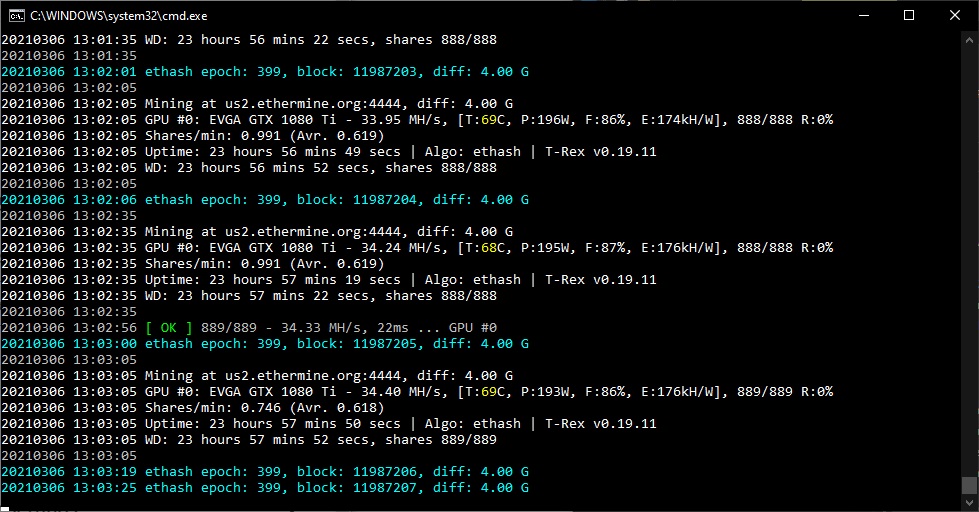
Unless you’re doing something graphically intensive, this won’t cause a severe drop in performance of the computer. Nearly all of the work occurs inside the graphics card, so any CPU-intensive activity will perform unaffected.
Mining pools all give you a place to observe how well your miners are performing, where you can check your status, change settings, and pay yourself for your hard work. Mining pools all pay at different times, but in general, once you reach a certain threshold you are automatically paid. At ethermine.org they pay you somewhere between once per day and every 14 days depending on how much you are making.
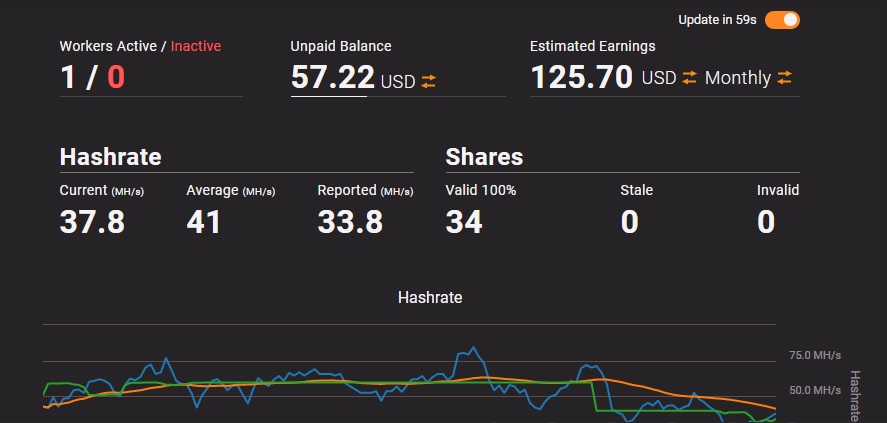
Once it’s payday, your wallet will notify you that some money has been deposited for you to use on whatever you like (maybe buying something cool from here <3)
Happy mining! <3