
This guide will walk you through the process of mining Ethereum using the program lolMiner on the ethermine.org pool.
Step 1: Download Exodus. This is where you store crypto that you are mining, and it’s how you spend it.
Step 2: Install Exodus. Double-click the installer you downloaded, and it will walk you through the process. When you you’re done, write down your Ethereum public wallet address in notepad. You can view it when you click on Ethereum, and then click “Receive”
Step 3: Download lolMiner. This is the program that mines for you.
Step 4: Set up lolMiner. This will make it mine for you instead of somebody else. When you unzip lolMiner, there is a file called “mine_eth.bat” that you will edit. Right-click that file, and choose “Edit” to do that.
You will change the server address, the port, and the wallet address in this file.
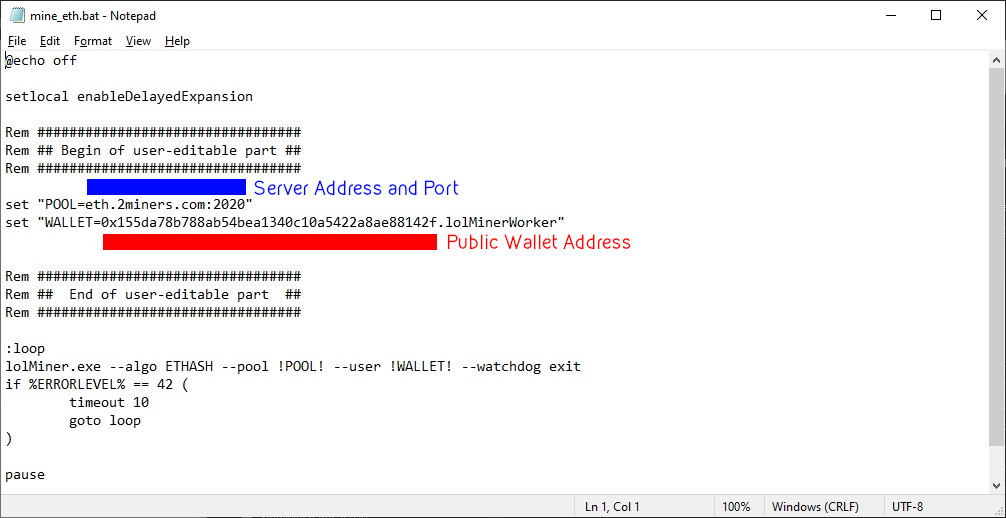
For the server address:
- In Asia, change it to asia1.ethermine.org
- In Europe, leave it like it is
- In the Eastern USA, change it to us1.ethermine.org
- In the Western USA, change it to us2.ethermine.org
After the colon, put in ethermine’s port. Change it from 2020 to 4444
Change the user name to your public wallet address for Ethereum. You got that from Exodus
Save and exit Notepad when you are done.
Step 5: Start lolMiner by double-clicking the mine_eth.bat file you just edited.
Step 6: Verify it’s working by going to ethermine.org and typing in your public wallet address. If it says you’re not mining anything, give it about 20 minutes and check again. If it still isn’t showing up, go to step 4 and verify you did everything correctly.
All done! You’ll be paid what you mine on ethermine’s payment schedule.